
Metatags
Meta Tags is a tool to debug, edit, and generate meta tag code. It lets you preview how your webpage will look when shared on Google, Facebook, X, and more.
Brief Overview of Meta Tags
Meta Tags is a specialized toolkit designed to debug, generate, and preview meta tag code for any website. Its primary purpose is to solve a common frustration for digital marketers and content creators: the inability to see how a webpage link will appear when shared on social media or listed in search results. The tool provides a visual interface to edit content and experiment with different titles, descriptions, and images, offering a real-time preview of how the link will look on platforms like Google, Facebook, X, LinkedIn, Pinterest, and Slack. This focus on a fluid, seamless workflow for iteration makes it a practical solution for optimizing a site's appearance online. By simplifying the technical process of meta tag creation, Meta Tags helps creators ensure their content makes a strong first impression, which is crucial for improving click-through rates and maintaining brand consistency across platforms. The platform also includes a versatile Instagram Font Generator, expanding its utility for social media customization.
Meta Tags Key Features for Content Creators
-
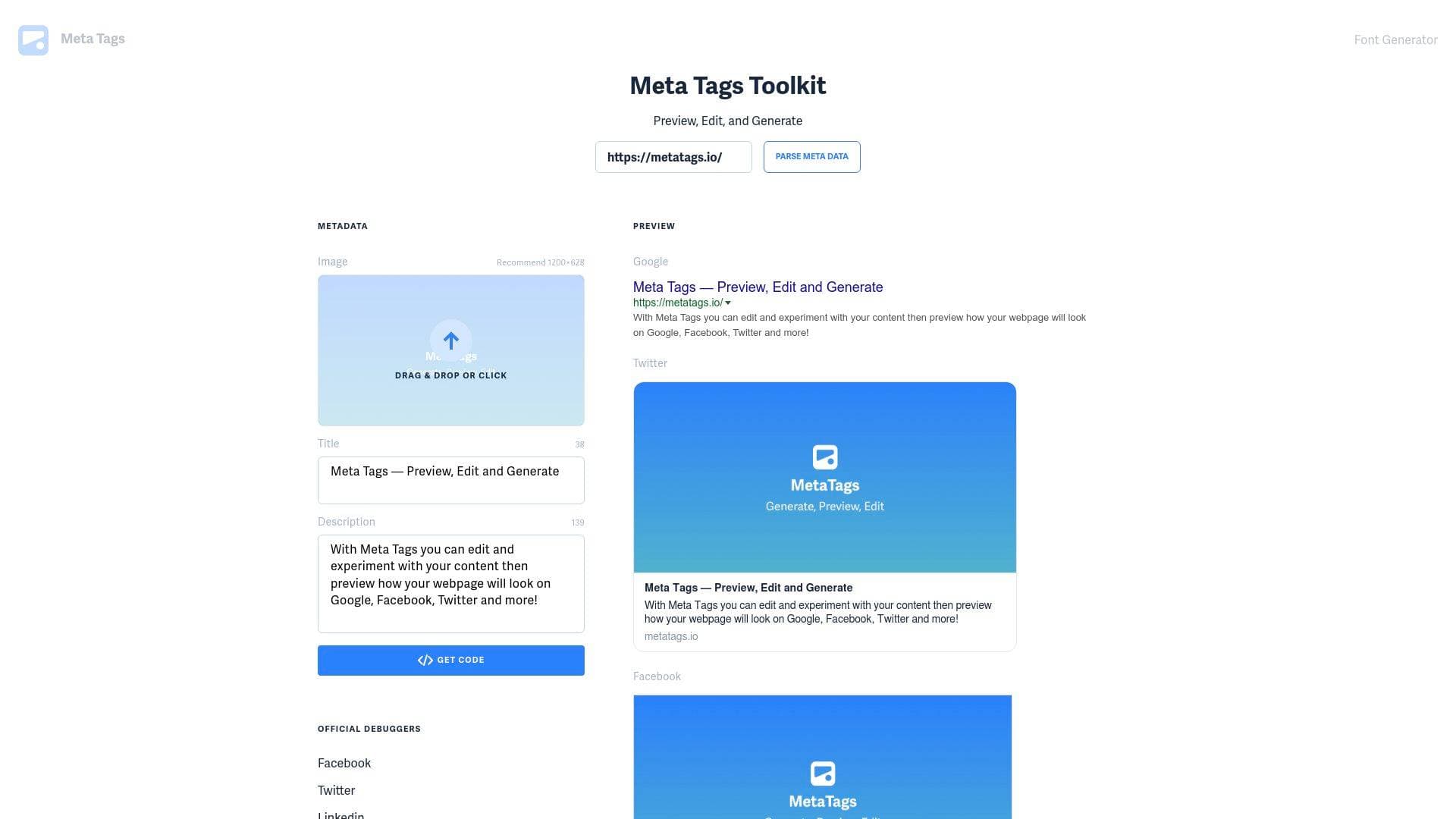
Live Multi-Platform Preview: The core function of the tool is its ability to generate live previews for multiple platforms simultaneously. After inputting a URL or editing content, you can instantly see how your webpage will be displayed on Google, Facebook, X (formerly Twitter), LinkedIn, Pinterest, and Slack, eliminating guesswork from the content creation workflow.
-
Interactive Meta Tag Editor: Creators can directly modify the title, description, and featured image within the tool's interface. As you type, the previews update in real-time, allowing for rapid experimentation to craft the most engaging and effective presentation for your links.
-
HTML Code Generation: Once the title, description, and image are optimized, Meta Tags generates the necessary HTML code snippets. This code can be copied with a single click and implemented directly into a webpage's header, making the technical application of your changes straightforward.
-
Image Upload and Optimization: The tool features a drag-and-drop interface for uploading a meta image, with a recommended size of 1200x628 pixels. This allows creators to test different visuals and ensure the chosen graphic is compelling and correctly formatted for social sharing, where the image is often the largest element.
-
Character Count Guidance: To aid in optimization, the editor displays character counts for the title and description fields. This feedback helps users stay within the recommended limits for platforms like Google, ensuring their message isn't truncated in search results.
-
Direct Links to Official Debuggers: For advanced validation, Meta Tags provides convenient links to the official debugging tools for Facebook, X, LinkedIn, and Google's Structured Data Testing Tool. This allows for a final check to ensure platforms are scraping the data correctly.
-
Instagram Font Generator: A valuable secondary feature is the Font Generator, which creates stylized text using Unicode characters. This tool is specifically designed to help creators customize their bios and posts on Instagram, X, and other social networks that don't support native font styling.
-
Copy-and-Paste Font Styles: The Font Generator offers a wide array of styles, from cursive and bold to decorative and typewriter fonts. Users can type their text, preview it in different styles, and click a "Copy" button to easily paste the formatted text into their social media profiles.
Meta Tags Target Users & Use Cases
Meta Tags is a versatile tool well-suited for a broad range of users involved in creating and promoting web content. Its straightforward interface makes it accessible to beginners, while its efficiency and direct debugging links appeal to seasoned professionals. The primary audience includes digital marketers, SEO specialists, content creators, social media managers, bloggers, and web developers.
This tool is ideal for solo creators and small teams who need to quickly optimize their web pages for sharing. Key use cases include:
- Optimizing Blog Posts: Crafting the perfect title, description, and featured image for a new article to maximize clicks when shared on social media.
- Improving SEO Performance: Refining a page's title tag—the most important meta tag for SEO—to improve its ranking potential and click-through rate in Google search results.
- A/B Testing Visuals: Uploading and previewing different meta images to determine which one is most visually appealing on platforms like Facebook and LinkedIn.
- Debugging Sharing Issues: Diagnosing why a URL is displaying an old title or the wrong image when shared by pasting the link into the tool.
- Generating Code for Implementation: Creating the correct HTML meta tags for a new landing page and providing them to a developer.
- Enhancing Social Profiles: Using the Instagram Font Generator to create a unique and eye-catching bio on Instagram or X.
- Maintaining Brand Consistency: Ensuring that all shared links from a website have a professional and consistent appearance across different channels.
How to Get Started with Meta Tags
The workflow for using Meta Tags is designed to be intuitive and efficient. Getting started involves a few simple steps:
- Input Your URL: Begin by pasting the URL of the webpage you want to analyze into the main input field. The tool will automatically fetch the existing meta tags.
- Edit and Experiment: Use the dedicated fields to edit the page's title and description. You can also drag and drop a new image or click to upload one to replace the current meta image.
- Review Live Previews: As you make changes, observe the visual previews for Google, Facebook, X, and other platforms. This allows you to see the immediate impact of your edits.
- Generate and Copy Code: Once you are satisfied with the appearance, click the "Get Code" button. This will generate the complete HTML meta tag code, which you can copy to your clipboard.
- Implement on Your Website: Paste the copied code into the
<head>section of your webpage's HTML to apply the changes.
Frequently Asked Questions About Meta Tags
What are meta tags? Meta tags are snippets of text and image content embedded in a webpage's code. They provide a summary of the page's content for search engines and social media platforms, influencing how a link appears when it is shared or displayed in search results.
Do meta tags help with SEO? Yes, though some are more important than others. The title tag is a very important factor for SEO rankings. The meta description does not directly impact rankings but is crucial for encouraging users to click on your link. The meta keyword tag is no longer used by Google and can potentially harm your ranking if misused.
What is the most important meta tag for SEO? The single most important meta tag for SEO is the title tag. It appears as the main clickable link in Google search results and is a significant factor in how search engines understand and rank your page.
What platforms can I preview my meta tags on? Meta Tags allows you to preview how your webpage will look when shared on Google, Facebook, X (formerly Twitter), LinkedIn, Pinterest, and Slack.
How does the Instagram Font Generator work? The Font Generator doesn't use actual fonts, which social networks block. Instead, it uses a system called Unicode to substitute standard letters with special characters that look like different font styles. This allows you to copy and paste the stylized text into profiles and posts.
Bottom Line: Should Content Creators Choose Meta Tags?
For any content creator, marketer, or website owner who shares links online, Meta Tags is an essential utility. Its core strength lies in its ability to provide immediate, visual feedback on how content will be perceived on the web's most important platforms. The tool successfully demystifies the technical process of creating and editing meta tags, making it accessible to everyone regardless of their coding knowledge.
The primary advantages are the streamlined workflow for experimentation and the confidence that comes from seeing a preview before publishing or sharing. The inclusion of the Instagram Font Generator is a clever addition that provides extra value for social media-focused creators. By focusing on the two elements that matter most—the title tag and meta image—Meta Tags helps users refine their digital first impression efficiently. It is a highly practical tool that directly addresses a common need in digital marketing and content management.
Details
One link. Every channel, rate, and piece of work brands need to evaluate you. Built for how creators actually get hired.
Claim your profile
Live creator, content, and marketing roles from real companies, with the pay, market, and context the raw job page never gives you.
Browse jobs

 Post Bridge