
How to Train ChatGPT on Your Brand Voice
Stop accepting generic AI drafts. Learn how to use ChatGPT with persona prompts, iterative feedback, and a brand voice guide to create consistent, on-brand content every time.
Details
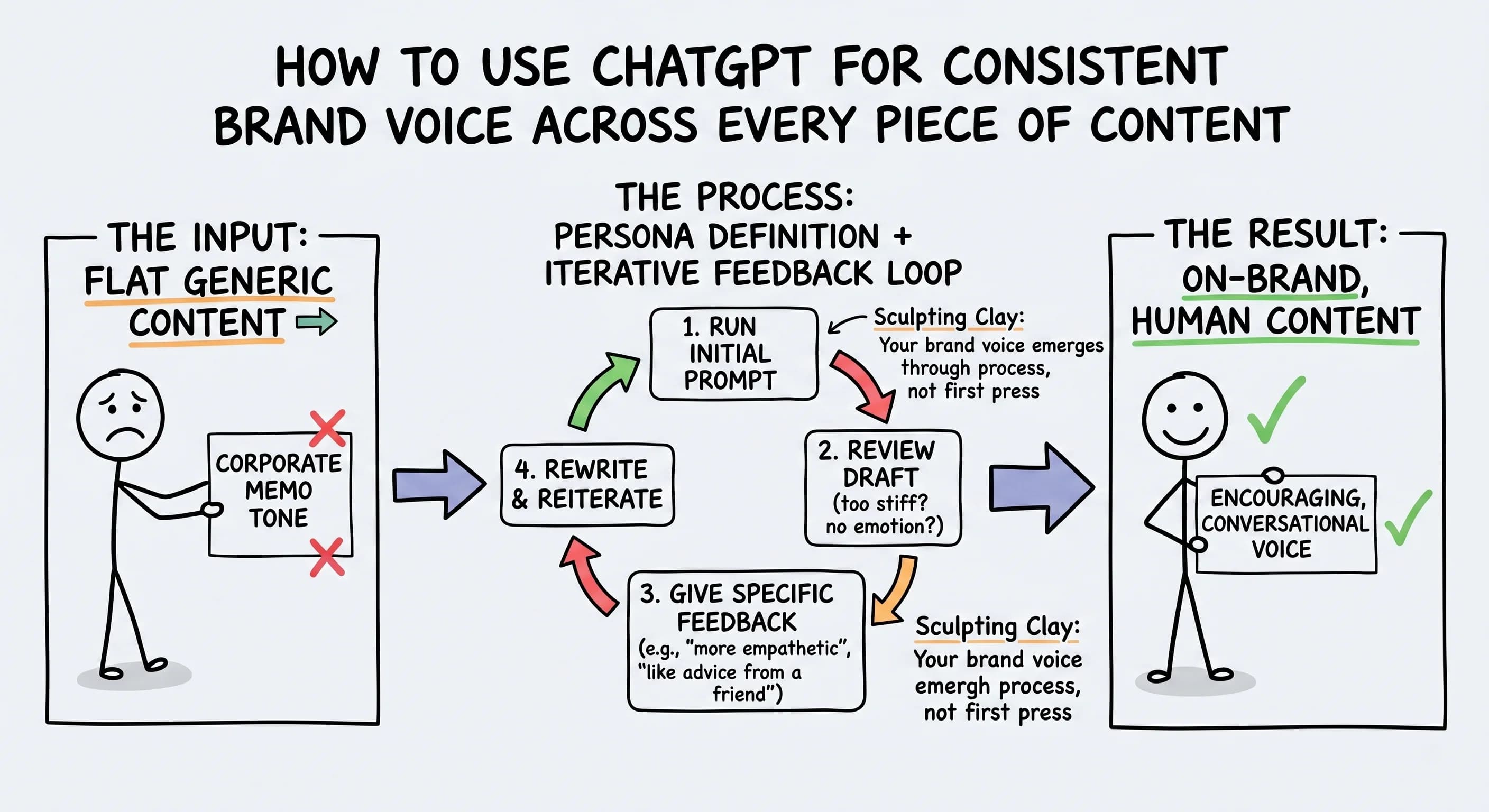
You hit generate, and ChatGPT delivers something that reads like a corporate memo. You tweak the prompt, hit generate again, and it comes back sounding like a different person entirely. Sound familiar? The good news is you don't have to settle for that, and you don't have to spend hours editing every single draft either.
With the right approach, specifically combining persona definition with an iterative feedback loop, you can get AI-generated content that actually sounds like you.
Why Your First ChatGPT Draft Is Just the Starting Point
 Most content creators treat AI like a vending machine. Put in a prompt, accept whatever comes out. But that approach is why so much AI content feels flat and forgettable.
The real magic happens in the refinement process. Research in prompt engineering consistently shows that feedback-driven prompting improves outputs because you can iteratively correct weaknesses when you give specific, targeted critiques. Think of it like sculpting clay: your brand voice emerges through the process, not the first press.
This is especially powerful for blog posts, social captions, email sequences, and any content that needs a consistent tone of voice across platforms. The first draft is just raw material.
How to Train ChatGPT on Your Brand Voice
 Want to know how to train ChatGPT on your brand voice? Start by defining two things inside every prompt: who ChatGPT is and who you are.
This persona definition is the step most creators skip entirely. Instead of asking for a generic rewrite, try something like: "Act as a supportive business coach and rewrite this in an encouraging, conversational tone." That single instruction shifts the entire output.
Research on persona-based prompting backs this up. Studies show that persona instructions help by giving the model a frame for tone, priorities, and style, making outputs more consistent and easier to steer. The more specific you are about the role, the better the results.
You can take this even further by combining role with goal and emotional frame. Instead of just "act as a coach," try: "Act as a supportive business coach; make this feel encouraging and reduce any sense of overwhelm." That specificity gives ChatGPT much more to work with.
You can also paste your brand voice guide or style guide directly into the prompt. Reference your brand guidelines or a summary doc and ask ChatGPT to match that voice consistently. If you don't have a brand voice guide yet, this is a great reason to build one.
Your Step-by-Step Prompt Refinement Process
 Here's exactly how to refine AI content until it feels right:
- Run your initial prompt and review the draft honestly. Don't just accept it.
- If the tone feels too stiff, respond with: "This feels too formal. Can you make it sound more encouraging, like advice from a supportive business coach?"
- If the emotional angle is missing, try: "Can you focus more on the emotional struggle of feeling overwhelmed and how this tip brings relief?"
- Tweak the persona by asking ChatGPT to rewrite it as a copywriter, a best friend, or a trusted mentor depending on your brand.
- Add evaluation criteria to each iteration, words like "more empathetic," "less formal," or "more concrete" give each round a clear target.
- Keep iterating until the message feels natural and on-brand.
The key insight here is that you're not hoping ChatGPT gets it right on the first try. You're steering it through the conversation with progressively better instructions. Each round of feedback shapes the next response. It's not permanent learning in the way humans learn, but within a conversation, every correction moves the output closer to your voice.
You can also try a self-refine approach: ask ChatGPT to critique its own output first, then revise it. This can reduce the number of back-and-forth turns you need and speed up the whole process.
Can You Customize the Voice on ChatGPT?
Absolutely. Beyond in-conversation feedback, you can use a Custom GPT to embed your brand voice guide, style guide, and brand guidelines directly into the AI's instructions.
A Custom GPT is the most practical way to train ChatGPT on your own data without writing any code. Upload your brand voice guide, your best past posts, and your style docs as its knowledge base, and the GPT references those documents on every request. For most creators, that is all the "training" you need. Developers who want to go further can use OpenAI's fine-tuning or the API to build a more deeply trained model, but that is overkill for simply keeping a brand voice consistent.
This is a genuine time-saver if you're creating content consistently. Instead of re-explaining your tone every single session, your Custom GPT already knows it. This creates voice consistency across different content types, whether you're writing ecommerce product descriptions, long-form blog posts, or social captions.
If you work with a team or a virtual assistant who also creates content, a Custom GPT becomes even more valuable. Everyone's working from the same voice foundation, which means less editing and fewer "that doesn't sound like us" moments.
The Difference Between Steering and Training
One thing worth being clear about: ChatGPT isn't learning your brand voice permanently from your feedback the way a human editor would. What's actually happening is in-context steering. Within a conversation, your corrections update how the model responds next. But start a fresh session, and you're starting fresh.
This is exactly why having a brand voice guide doc you can paste in, or a Custom GPT with your instructions already embedded, makes such a big difference. You're not relying on the AI to remember. You're building a system that consistently produces on-brand output from the start.
Make AI Content Sound Like Your Unique Voice
The goal isn't just usable content. It's content that sounds like you wrote it on your best day.
By combining persona prompts, iterative feedback, and a clear brand voice guide, you dramatically cut down on manual editing while keeping your brand voice consistent. That's the whole point: less time fixing, more time creating.
Start your next draft in ChatGPT, and instead of accepting the first response, ask it to tweak, refine, and rewrite until it truly fits. Respond with what's off. Name the emotional tone you're missing. Point to the persona you want it to inhabit.
Your brand voice is worth the extra five minutes of refinement. And once you build the habit, it stops feeling like extra work and starts feeling like part of the process.
Read more about Becoming a Content Creator
📚 Complete Guides
- How to Become a Content Creator: Complete Beginner's Guide
- Content Creator Platform Guide: Choose the Right Platform to Start Your Creator Journey
⚡ Tactics & Strategies
- 50% Retention Rate Optimization for YouTube Algorithm Success
- Age Bracket as Superpower Strategy for Older UGC Creators
- AI Workflow Integration for Content Reduction
- Audience Consistency Strategy to Avoid Algorithm Penalties
- Audience Poll on Instagram to Source Q&A Content in Advance of Recording
📄 Related Articles
- Personal Brand Statement Examples (and How to Write Yours)
- How to Choose a Niche as a Content Creator: A Step-by-Step Guide
- Viral Hooks: How to Write Openers That Get Millions of Views
- How to Find Trending Audio on Instagram (The Easy Way)
- Reverse Prompt Engineering: Turn Great ChatGPT Answers Into Reusable Prompts
- Growing an Online Community: How to Scale While Preserving the Magic of Micro-Communities
- Original Content Ideas: Break Free from Competitor Crowdsourcing
- How to Use the Instagram Question Sticker to Source Podcast Questions
Read more about Systems, Workflows & Operations for Content Creators

Alex Kirillov
Details
One link. Every channel, rate, and piece of work brands need to evaluate you. Built for how creators actually get hired.
Claim your profile
Live creator, content, and marketing roles from real companies, with the pay, market, and context the raw job page never gives you.
Browse jobs