Using ChatGPT to Write Email Subject Lines That Skyrocket Your Open Rate
Learn how using ChatGPT to write email subject lines with the right prompt and preview test workflow can dramatically improve your newsletter open rate.
Details
Using ChatGPT to Write Email Subject Lines That Skyrocket Your Open Rate
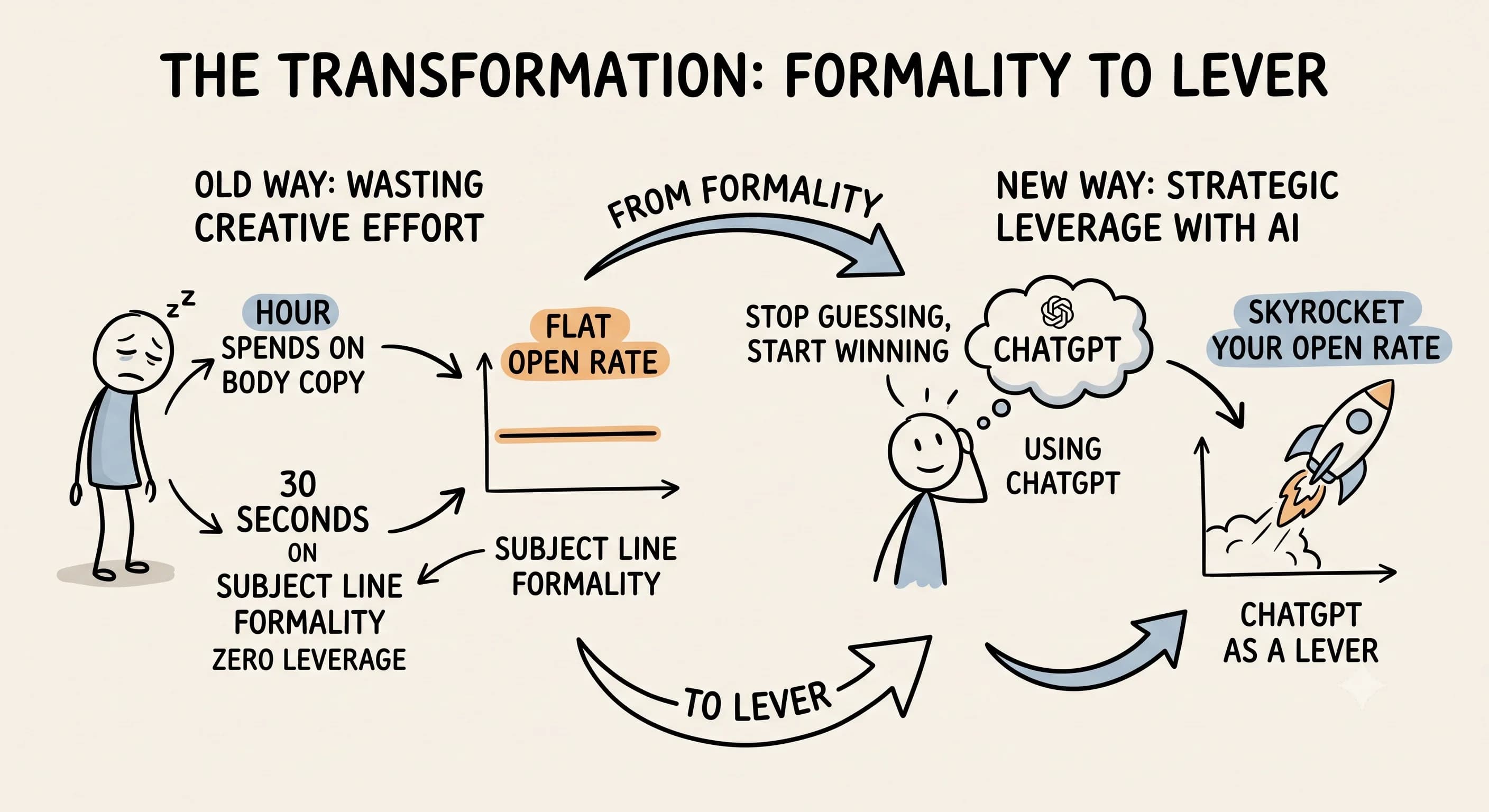
Are you tired of writing email subject lines from scratch, only to watch your open rate stay flat? You spent an hour crafting the perfect email. The storytelling is sharp, the call to action is clear, and the value is undeniable. Then you spend thirty seconds slapping a subject line on it and hit send.
Sound familiar? Most content creators treat the subject line like a formality, a label, not a lever. Your subject line determines whether everything else you wrote gets read at all. A good subject line is the single biggest driver of open rate, and if you are not optimizing it intentionally, you are leaving real results on the table.
The good news? Using ChatGPT to write email subject lines has completely changed the game for newsletter writers who want to stop guessing and start winning.
What Is ChatGPT and Why Does It Help With Email Marketing?
When you hear about ChatGPT, what do you think of? Most people think of a chatbot. But for digital marketing, it is far more than that. ChatGPT is an AI language model that helps you write, brainstorm, and refine copy at scale. It can generate subject lines, draft body copy, and even check compliance, making it a powerful tool for anyone serious about campaign performance.
ChatGPT can also act as an email subject line generator, producing multiple variations in seconds based on the context you provide. This AI email capability means you spend less time staring at a blank screen and more time improving your campaigns. Why fight AI when you can capitalize on it instead?
Why Are Email Subject Lines So Important?
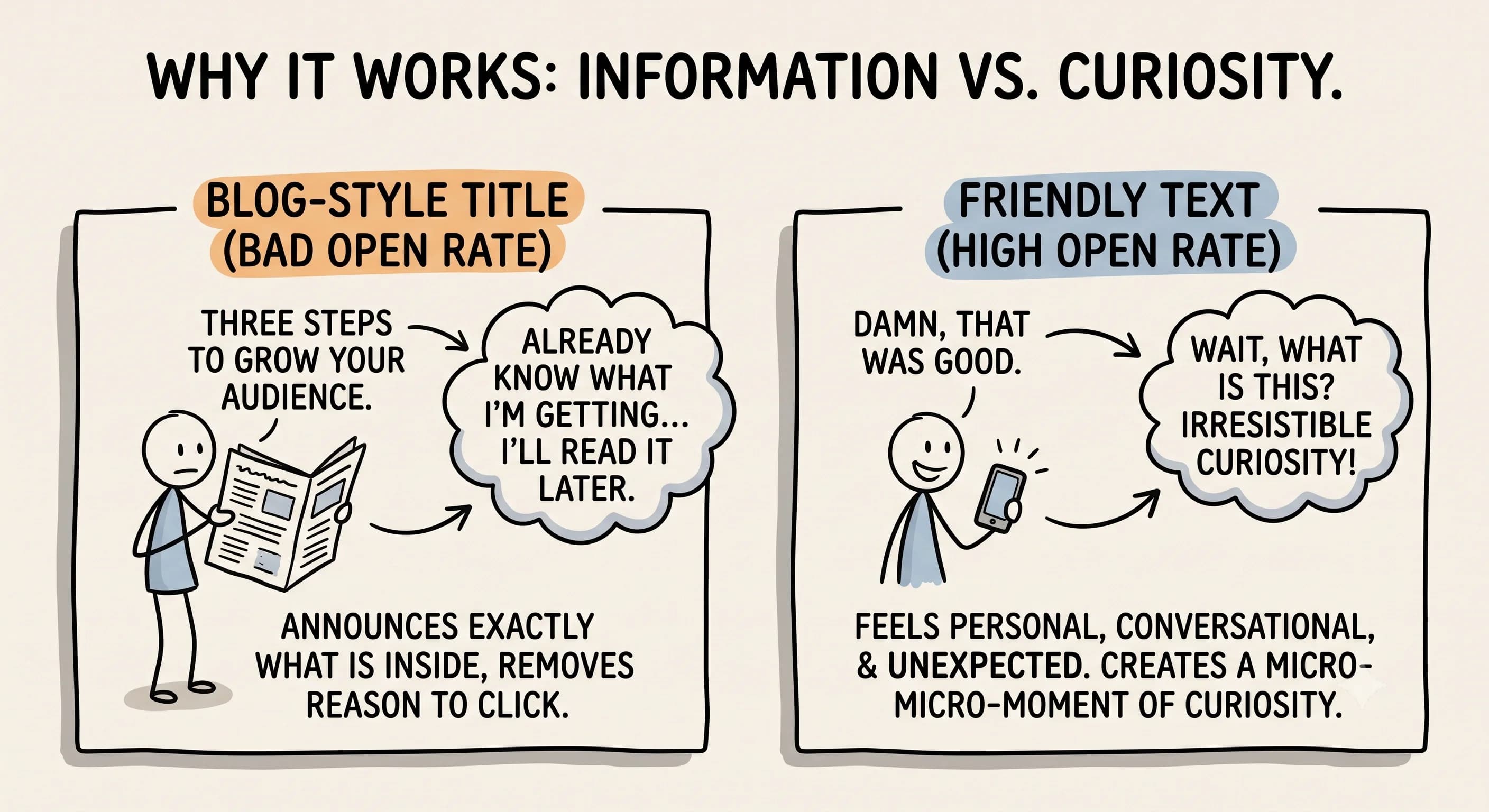 The subject line is the first thing a subscriber sees when they receive your message. Click-through rates and open rates both trace back to that single line of text. The highest-performing subject lines share one quality: they create irresistible curiosity without giving everything away. They feel personal, conversational, and a little unexpected. Think "Damn, that was good" rather than "Three Steps to Grow Your Audience."
Blog-style titles announce exactly what is inside, which removes the reader's reason to click. When someone already knows what they are getting, they can decide it is not urgent and come back later. Which usually means never.
Attention-grabbing subject lines feel like a text from a friend, not a headline from a magazine. They make the reader think, "Wait, what is this?" That micro-moment of curiosity drives the highest open rates.
According to Prospeo, prompt templates that explicitly call for curiosity-driven, contrarian, and conversational options consistently outperform prompts that simply ask for blog-style titles.
How to Use ChatGPT to Generate Email Subject Lines That Actually Work
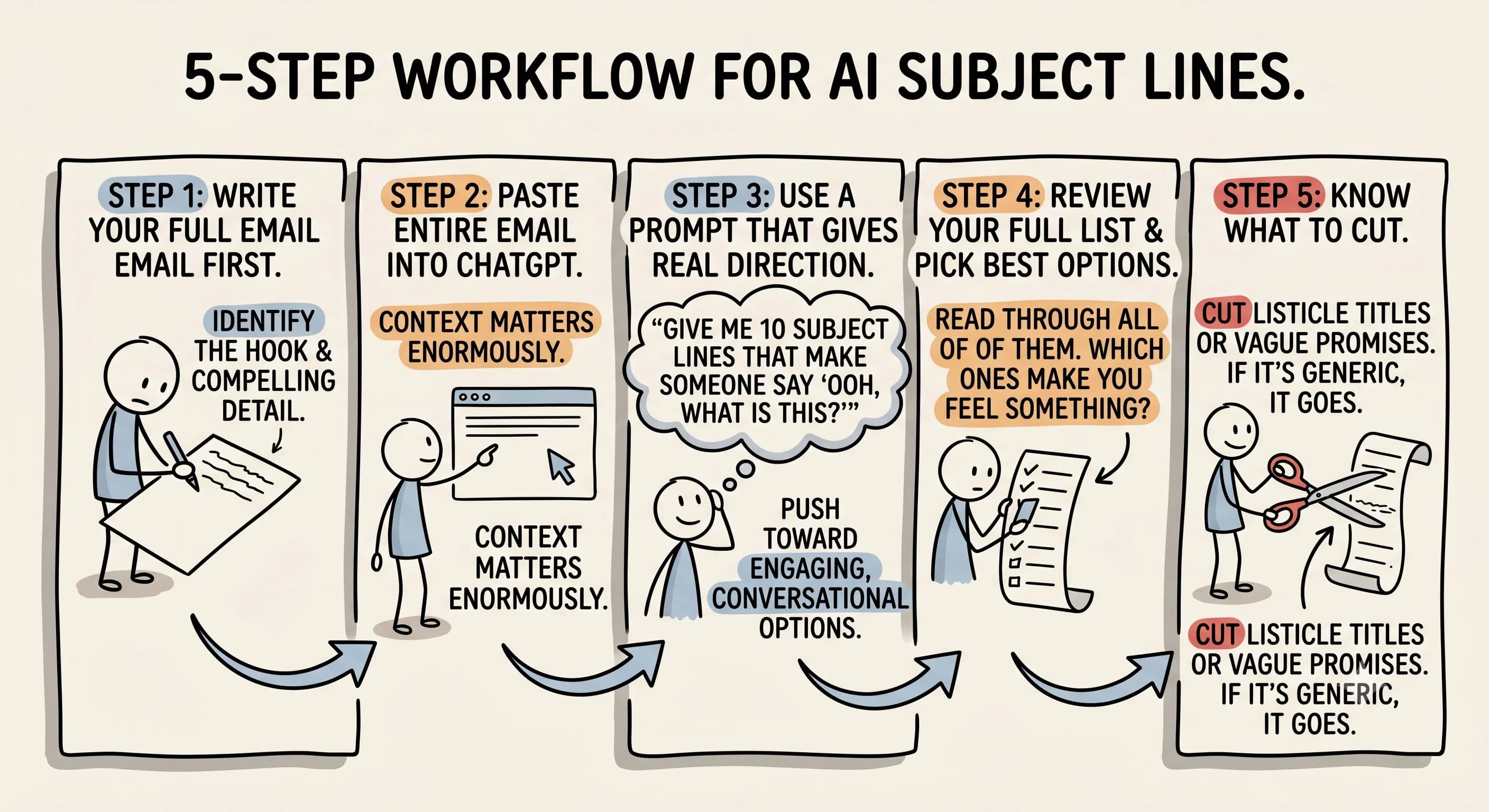 Here is the workflow that content creators use to generate subject lines for email campaigns and dramatically improve performance. It is straightforward, repeatable, and it works.
Step 1: Write your full email first.
Do not try to write the subject line before the body copy. Your email needs to exist in complete form before you can identify the emotional hook or the most compelling detail worth teasing. Writing the subject line first is like writing a movie trailer before filming the movie.
Step 2: Paste the entire email into ChatGPT.
Once your email content is done, open your AI tool and paste the whole thing in. Context matters enormously. According to Customer.io, ChatGPT works well for flexible ideation when the prompt includes your target audience, your goal, and the full context of the email, not just the topic.
Step 3: Use a chatgpt prompt that gives real direction.
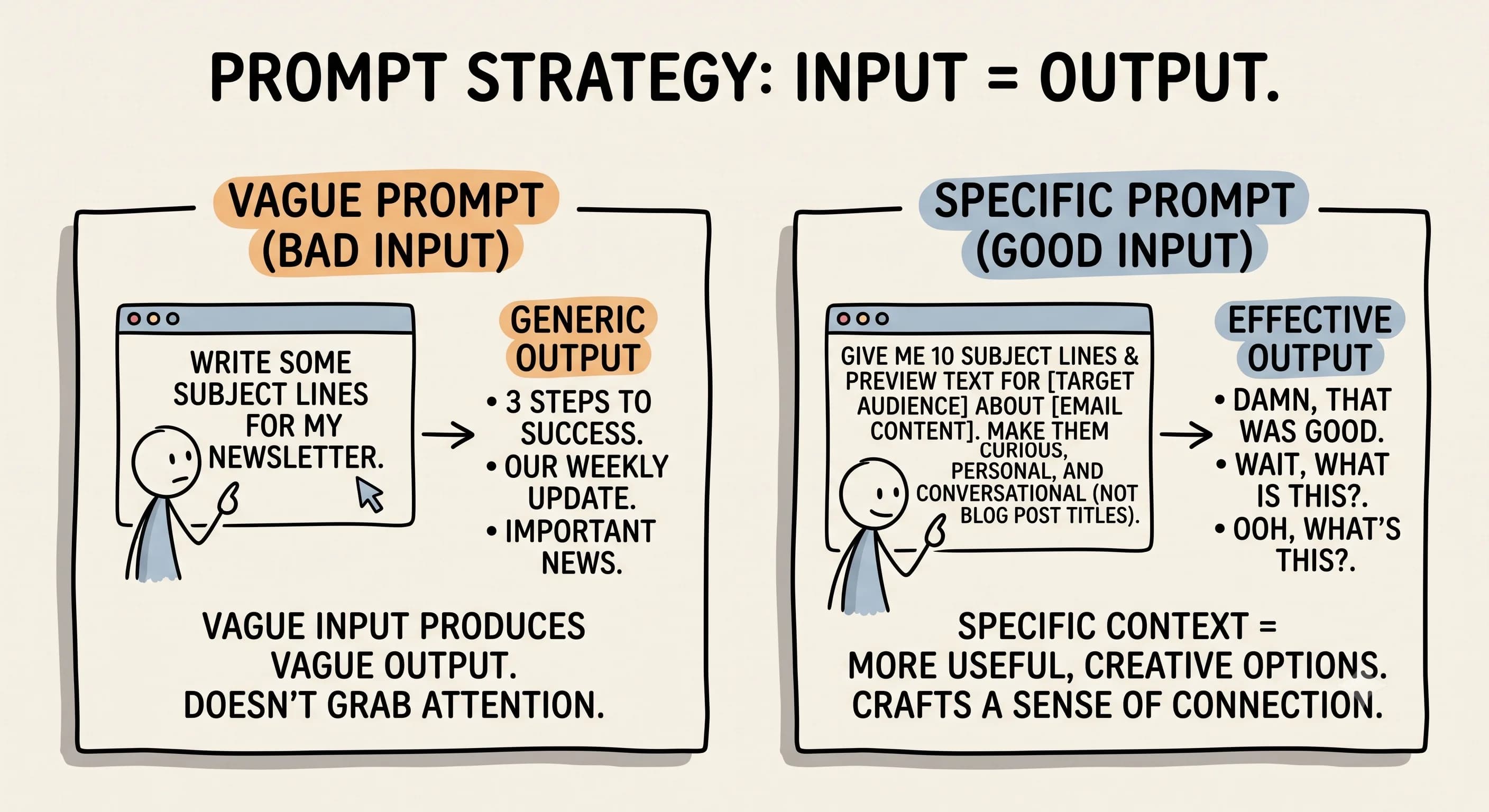
This is where most people go wrong. A well-crafted AI prompt can help you get far better results than a vague request. Use this: "Give me 10 subject lines and preview text that would make someone say, 'ooh, what is this?' Make them feel personal and curiosity-driven, not like blog post titles." This prompt can help you generate a list of email options that is far more useful than generic output.
That framing pushes the tool toward engaging, conversational options you can actually use. According to HubSpot, ChatGPT is particularly strong at generating many variants quickly, which is exactly what this prompt structure produces.
Step 4: Review your full list and pick the best options.
You will get different ideas, some punchy, some mysterious, some that lean into emotion. Do not just pick the first one. Read through all of them and notice which ones make you feel something. Prospeo supports batching five to ten options grouped by angle, including curiosity-driven and personalized lines, so you are comparing genuinely different approaches.
Step 5: Know what to cut.
Anything that sounds like a listicle title or a vague promise with no intrigue should go. If a subject line could apply to any email from any brand, it is too generic.
What Are the Best ChatGPT Email Subject Line Generation Tips?
 Want to captivate your audience with a subject line that consistently performs? Here are the tips that matter most when you use AI to generate compelling copy.
- Always ask for variations, not just one option. Aim for at least ten so you have real choices.
- Include your target audience in every chatgpt prompt. Effective subject lines speak directly to one person, not everyone.
- Generate a subject line for each stage of your funnel separately. A product or service launch email needs a different tone than a re-engagement message.
- Want to craft a great email newsletter opener? Tell the tool the newsletter name, audience, and topic so it can generate relevant and appealing copy.
- Include word count, tone, and brand constraints in your prompts. This helps you craft lines that fit your voice.
- Use chatgpt prompts to generate email subject options for a followup sequence as well as your main campaigns. Subject lines in followup emails are often neglected.
Provide ChatGPT with specific context and it will provide more useful output. Vague input produces vague output. ChatGPT can provide a wide range of creative options when the brief is clear, and chatgpt may surprise you with angles you had not considered.
ChatGPT vs Claude: Which Should You Use?
Both tools are genuinely useful, but they perform slightly differently.
According to a 30-day AI subject line experiment covered by Email Marketing Daily, ChatGPT produced more variety but needed more editing, while Claude performed better for maintaining brand voice when prompts included detailed audience information. HubSpot echoes this, noting that Claude is useful for checking consistency across a campaign.
If you want a wide range of options to choose from, start with ChatGPT. If you are writing for a very specific audience with a distinct tone, Claude is worth the extra context. Is prompting limited to ChatGPT? No. Any AI tool that accepts natural language instructions can help you write subject lines. ChatGPT just happens to work especially well as an email subject line generator because of how it handles creative variation. Many creators use both, and that is completely reasonable.
How the Email Subject Line Generator Approach Works in Practice
Using AI to generate creative options is not just about beating writer's block or overcoming a creative block. It is about building a repeatable system that helps you craft copy faster without sacrificing quality. The email's subject line is the first thing a subscriber sees when they receive a message, and it deserves the same care as the body text as well.
Does an AI-powered email subject line generator use your data? Most tools, including ChatGPT, do not store your prompts by default when privacy settings are enabled. Always check the platform's policy if you are handling sensitive information.
What kind of AI powers these tools? ChatGPT runs on large language models trained on vast amounts of text, which is why it can generate creative options across so many different contexts. That breadth helps you find the perfect subject line angle you might never have thought of on your own.
Can I connect ChatGPT directly to my email marketing platform? Not natively, but you can use automation tools to bridge the two. This helps you create a list of email subject line options inside your existing workflow and push them directly into your email software for testing.
Effective email marketers use A/B testing to let their audience decide which line performs best. Use AI to generate the variants, then let your subscribers tell you which one had the highest open rate. This approach helps increase the likelihood that your next campaign outperforms your last.
The Preview Test: Experience It Like Your Reader Would
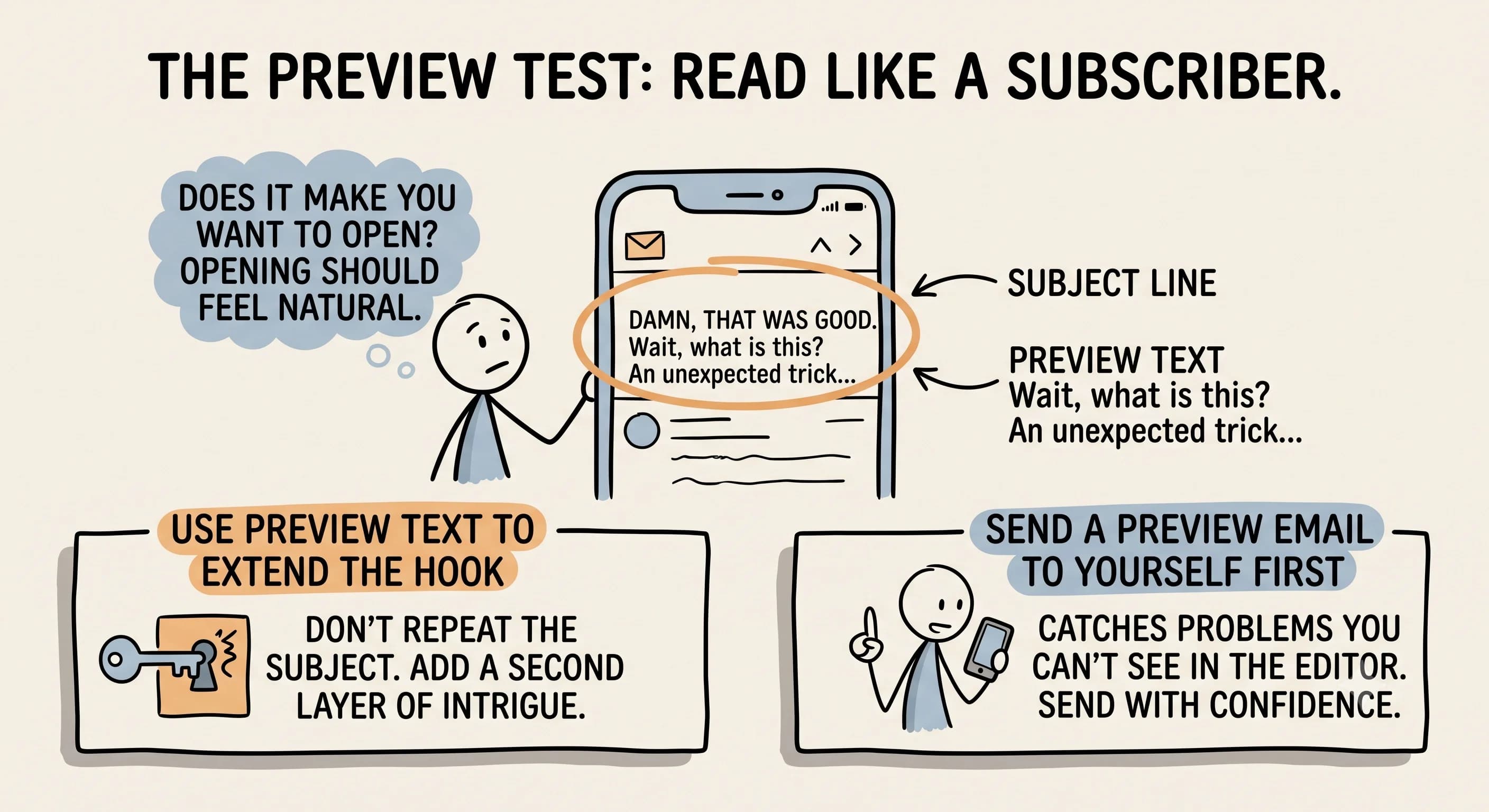 Generating options with your chatgpt email prompt is only half the process. The other half is something almost no one does: send yourself a preview email before you send to your list.
Open that preview on your phone and read it as if you are a subscriber seeing it for the first time. This is what your reader will see when they receive the message. Does the subject line make you want to open it? Opening the email should feel like a natural next step, not an obligation.
According to HubSpot, subject lines work better when preview text extends the hook without repeating it. Use the preview text to add a second layer of intrigue, not a restatement of the first. This step catches problems you simply cannot see inside your editor and helps you use the technology effectively right up to the moment of sending.
Can I generate multiple subject lines at once? Yes, and you should. Batch generation through your prompt workflow saves time and gives you enough options to run a proper comparison.
So, Are You Ready to Write Subject Lines with a High Open Rate?
The most reliable method combines your own voice with AI assistance. You bring the context, the story, and the relationship with your audience. The tool brings scale, producing options in seconds and helping you create effective copy without agonizing over every word.
One overlooked tip: go look at the emails already in your inbox. Which ones made you open without thinking? You already know what attention-grabbing looks like as a consumer. Let that instinct inform how you prompt and select your own options. That is the real secret to using ChatGPT to help you write lines that perform. It helps you craft a sense of connection with the reader and a sense of urgency that feels natural rather than forced.
Do you have more than one option you really like? Would you waste potential email opens by skipping an A/B test? You should not. Testing is one of the smartest moves you can make. Use email subject lines with ChatGPT to build a strong shortlist, run the preview test, and send with confidence.
Your next email deserves more than a thirty-second afterthought.
Read more about Becoming a Content Creator
📚 Complete Guides
- How to Become a Content Creator: Complete Beginner's Guide
- Content Creator Platform Guide: Choose the Right Platform to Start Your Creator Journey
⚡ Tactics & Strategies
- 50% Retention Rate Optimization for YouTube Algorithm Success
- Age Bracket as Superpower Strategy for Older UGC Creators
- AI Workflow Integration for Content Reduction
- Audience Consistency Strategy to Avoid Algorithm Penalties
- Audience Poll on Instagram to Source Q&A Content in Advance of Recording
📄 Related Articles
- Voice of the Customer: A Creator's Guide to Magnetic Messaging
- Content Creator Burnout: Signs, Prevention, and the Mindset That Fixes It
- Influencer Authenticity: How Honest Product Reviews Drive Real Influence
- TikTok Creator Search Insights: How to Find Content Gaps That Guarantee Views
- The AI Content Creation Workflow: Turn 37 Seconds Into 1,200 Words
- The AI Content Workflow That Cuts Production Time by 70%
- Influencer Campaign Report: How Smart Reporting Systems Build Stronger Brand Relationships
- How to Ask Someone to Be on Your Podcast (And Actually Get a Yes)
Read more about Monetization & Business Models for Content Creators
📚 Complete Guides
- Content Creator Monetization: Proven Revenue Streams
- Content Creator Income Streams: 7 Ways to Build Financial Stability
⚡ Tactics & Strategies
- 30 Daily Outbound Pitches for UGC Deal Generation
- Affiliate Code Negotiation Using Membership Audience Influence
- Age Bracket as Superpower Strategy for Older UGC Creators
- B2B Merchandise Bulk Sales to Industry Professionals- Packaging Products as Client Gifts for Lawyers and Service Providers
- Becoming Your Own Sponsor by Plugging Your Offer Within Episodes
🧮 Calculators
Read more about Systems, Workflows & Operations for Content Creators

Alex Kirillov
Details
One link. Every channel, rate, and piece of work brands need to evaluate you. Built for how creators actually get hired.
Claim your profile
Live creator, content, and marketing roles from real companies, with the pay, market, and context the raw job page never gives you.
Browse jobs